Can't add fix versions on the fly anymore

I am used to add new versions while in the create issue process.
But in the latest version of youtrack (2017.3), i don't have the button to add new versions anymore.
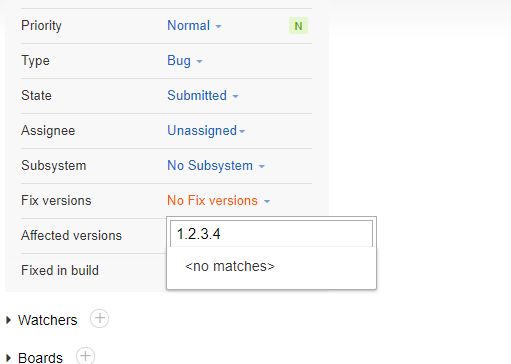
Any hint what the reason for this can be?
My user is project admin and system admin, and i can create new versions when i go via "settings/custom fields/project/fix version/add value". What is the reason that i cannot add a new version during the creation of an issue anymore?
Please sign in to leave a comment.
Hello,
Could you please check, if there is such option before you enter the number of the fix version?
No, there is no "add values" at all
Could you please provide the exact build version of YouTrack?
What is your role in this project? Can you add the new version in Projects > Project_name > Edit project > Fields?
The build im using is actually
Manuel, unfortunately it's a bug: https://youtrack.jetbrains.com/issue/JT-42727 It's already fixed, so we can recommend you to upgrade to the latest build (if your license allows it).
Let us know if you have any further questions. Thanks!