Problems installing

I'm trying to get youtrack installed on a RedHat Enterprise v. 4 OS under apache 2.2.x. I've got it running as a service, following the alternate instructions. I've confirmed that it's running, no problem. I've changed the httpd.conf to proxy to the service, and that is working (sort of) as well.
When I try to get into youtrack for the first time, this is what I see:
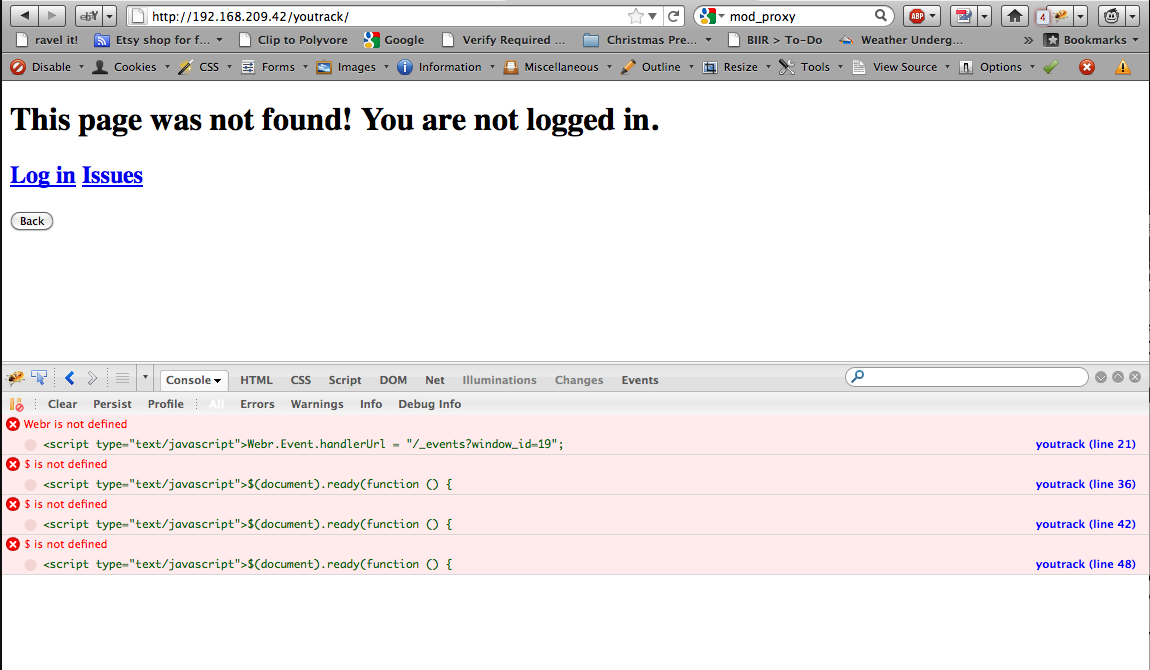
Note the scripting errors in the page. Because of those, I can't log in and get started. It looks to me like I'm missing some configuration - the scripts apparently can't find the dependencies they need. My guess right now is that the proxy set-up isn't quite right and is messing up the scripts' paths. Here's a copy of the proxy section of my httpd.conf:
# turn forward proxy off
ProxyRequests Off
ProxyStatus On
<Proxy *>
Order deny,allow
Allow from all
</Proxy>
<VirtualHost 192.168.209.42:80>
ServerAdmin you@example.com
ServerName 192.168.209.42:80
DocumentRoot "/usr/local/apache2/htdocs"
# configure reverse proxy paths
ProxyPass /youtrack http://localhost:8112/
ProxyPassReverse /youtrack http://localhost:8112/
ProxyPreserveHost On
</VirtualHost>
Any suggestions?
Attachment(s):
Screen shot 2011-07-28 at 12.25.41 PM.png
Please sign in to leave a comment.
Hello!
First of all you need to check what is failing - your frontend(apache) or backend(youtrack).
Let's start with backend. Can you go to http://localhost:8112/youtrack and post here the result?
Tried using Telnet - got the following response:
> telnet localhost 8112
Trying 127.0.0.1...
Connected to localhost.localdomain (127.0.0.1).
Escape character is '^]'.
GET /youtrack HTTP/1.1
HTTP/1.1 400 Bad Request
Connection: close
Server: Jetty(7.x.y-SNAPSHOT)
Connection closed by foreign host.
It is okay, because you forgot about "host: bla-bla-bla" in your telnet request.
Can you send request to your youtrack via browser? So you can see your backend's answers with javascripts.
Hi again!
You cannot use your youtrack, started as JAR, at http://192.168.209.42/youtrack URL.
There are two ways:
1) You can use
ProxyPass / http://localhost:8112/
ProxyPassReverse / http://localhost:8112/
so your URL will be like http://192.168.209.42/.
2) You can set up Tomcat and put youtrack to /youtrack folder.
Hope this helps.
No, I didn't. This format works for telnet - I tested by connected to other sites, including my svn/apache repository. No problem there. BTW - I had already connected via browser from a remote machine. See the 1st post and the screenshots I attached. The machine I'm installing on doesn't have a browser. Not even lynx.
Yes, thank you. This works perfectly. Fortunately, I don't have anything else running under this address so I won't have to change anything else about my setup.