Applying commands to string fields

Hi,
I am trying to apply batch commands to a string field.
In the command window, I type the command as follows
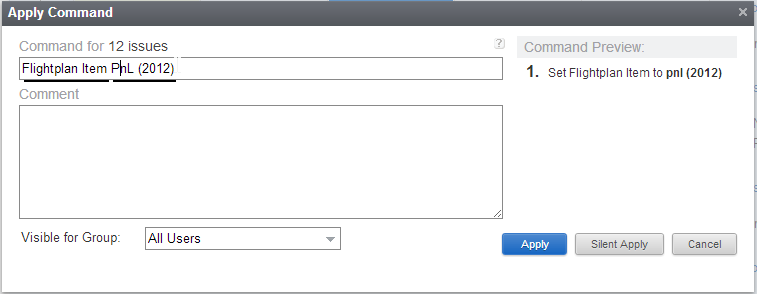
However, I would expect that YouTrack will respect my string value as entered, however it converts the entire string value to lowercase as noted in the Command Preview.
Is there way to overcome this issue or some type of workaround?
I am trying to apply batch commands to a string field.
In the command window, I type the command as follows
However, I would expect that YouTrack will respect my string value as entered, however it converts the entire string value to lowercase as noted in the Command Preview.
Is there way to overcome this issue or some type of workaround?
Please sign in to leave a comment.
I couldn't reproduce this. Does value set with the lowercase in the end? Or it displays with lowercase only in command preview?
What version of YouTrack do you use?
Thank you.
Yes, it does set it as lowercase in the end even though it was uppercase in the command.
We are using YouTrack 4.1 (build #5603 [07-Nov-2012 17:53] )
Regards,
Ahmad
Yes, we had similar issue http://youtrack.jetbrains.com/issue/JT-17909 , please update your YouTrack.
Thank you.