Error in Gmail Stmp setup

Hello,
I've installed the stand-alone YouTrack 5.0.5.
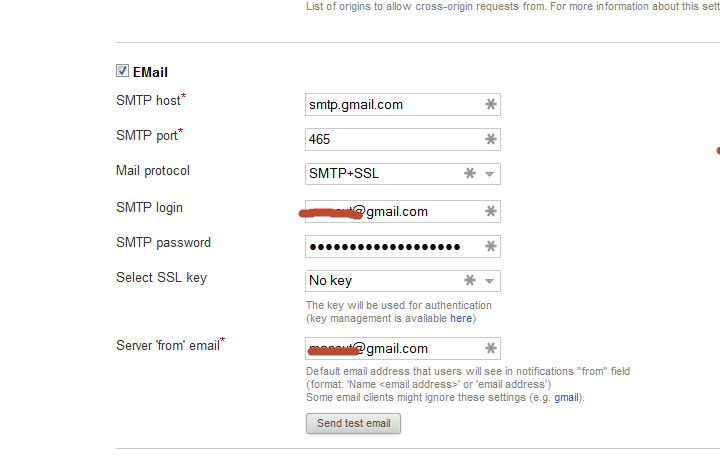
I tried to setup the email account in "Settings", with the following parameters:
SMTP Host: smtp.google.com
SMTP port: 465
Mail Protocol: SMTP+SSL
SMTP login: (my gmail login)
SMTP password: (my gmail password)
SSL Key: No key
Server 'from' email: (my gmail address)
When I test the settings via the "Send test email" button, I get the following exception:
Can't send email to (my destination email) Mail server connection failed; nested exception is javax.mail.MessagingException: Exception reading response; nested exception is: javax.net.ssl.SSLException: java.lang.RuntimeException: Unexpected error: java.security.InvalidAlgorithmParameterException: the trustAnchors parameter must be non-empty
Any suggestions?
Thanks
Regards
Alessandro

I've installed the stand-alone YouTrack 5.0.5.
I tried to setup the email account in "Settings", with the following parameters:
SMTP Host: smtp.google.com
SMTP port: 465
Mail Protocol: SMTP+SSL
SMTP login: (my gmail login)
SMTP password: (my gmail password)
SSL Key: No key
Server 'from' email: (my gmail address)
When I test the settings via the "Send test email" button, I get the following exception:
Can't send email to (my destination email) Mail server connection failed; nested exception is javax.mail.MessagingException: Exception reading response; nested exception is: javax.net.ssl.SSLException: java.lang.RuntimeException: Unexpected error: java.security.InvalidAlgorithmParameterException: the trustAnchors parameter must be non-empty
Any suggestions?
Thanks
Regards
Alessandro
Please sign in to leave a comment.
Please, take a look at the extensions applied for the gmail, this link is pointed under 'From' email option.
Thank you and let me know if need an assistance with this.