How to start YouTrack (as Win Service) in restore root password mode?

I'm running YouTrack as a Windows Service, but I need to reset/restore the root password.
I have tried :
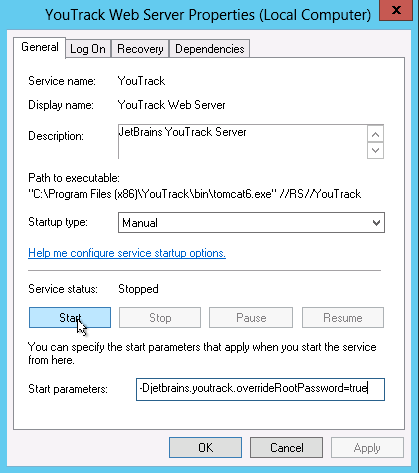
Editing the service properties to include Startup Parameters :
-Djetbrains.youtrack.overrideRootPassword=true
-Djetbrains.youtrack.overrideRootPassword=r00t
But neither works, I also tried the old flag for doing this, -Djetbrains.charisma.restoreRootPassword=true
here is a screen shot of how I am trying to pass parameters to the service. Is this the correct place for this? Please let me know the best way to go to reset root for YouTrack served on Windows as a service.
I have tried :
Editing the service properties to include Startup Parameters :
-Djetbrains.youtrack.overrideRootPassword=true
-Djetbrains.youtrack.overrideRootPassword=r00t
But neither works, I also tried the old flag for doing this, -Djetbrains.charisma.restoreRootPassword=true
here is a screen shot of how I am trying to pass parameters to the service. Is this the correct place for this? Please let me know the best way to go to reset root for YouTrack served on Windows as a service.
Please sign in to leave a comment.
You're a bit wrong with the place for providing parameters.
Please, take a look at this guide. You can call Tomcat via the command line as follows:
or under Program files\YouTrack\bin\tomcat6w.exe manually.
Let me know, if need any further assistance on this.
argument on the Java tab in the TomCat service launcher.