Order By Links doesn't seem to be working

Hello, just getting started with YouTrack. Setting up my project and I have issues that are dependent on other issues. I'd like to see them ordered by the way I have them linked. When I do a 'Order By Links' search, it always seems to order by issue id instead of dependancies. Am I doing something wrong? Or am I looking at this wrong?
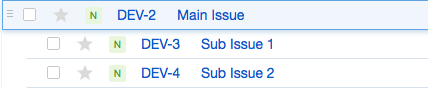
I've attached an example. I have two subtasks of DEV-2. They are in order of the way I created them. DEV-3 then DEV-4. Later I find that I need DEV-4 to be done before DEV-3. I make DEV-4 depend on DEV-3 but nothing happens. I also made my own Issue Link type that is of type Depend. I added that to DEV-4 but still nothing. I would like to see DEV-3 below DEV-4 but I haven't been able to do that.
My search box contains: project: {Software Development} sort by: {links} desc
I've attached an example. I have two subtasks of DEV-2. They are in order of the way I created them. DEV-3 then DEV-4. Later I find that I need DEV-4 to be done before DEV-3. I make DEV-4 depend on DEV-3 but nothing happens. I also made my own Issue Link type that is of type Depend. I added that to DEV-4 but still nothing. I would like to see DEV-3 below DEV-4 but I haven't been able to do that.
My search box contains: project: {Software Development} sort by: {links} desc
Please sign in to leave a comment.
Thank you for trying out YouTrack!
We already have Depend link type. Check this under Administration> Issue link types.
I've tested with this:
according to your scenario and it works.
Thank you.
the following but it still won't change the order of the list:
Am I setting this up incorrectly? I've attached screenshots for how I currently have it setup. I would expect to see a difference in the order if I choose asc vs. desc.