Tried To Create First Workflow But Error...

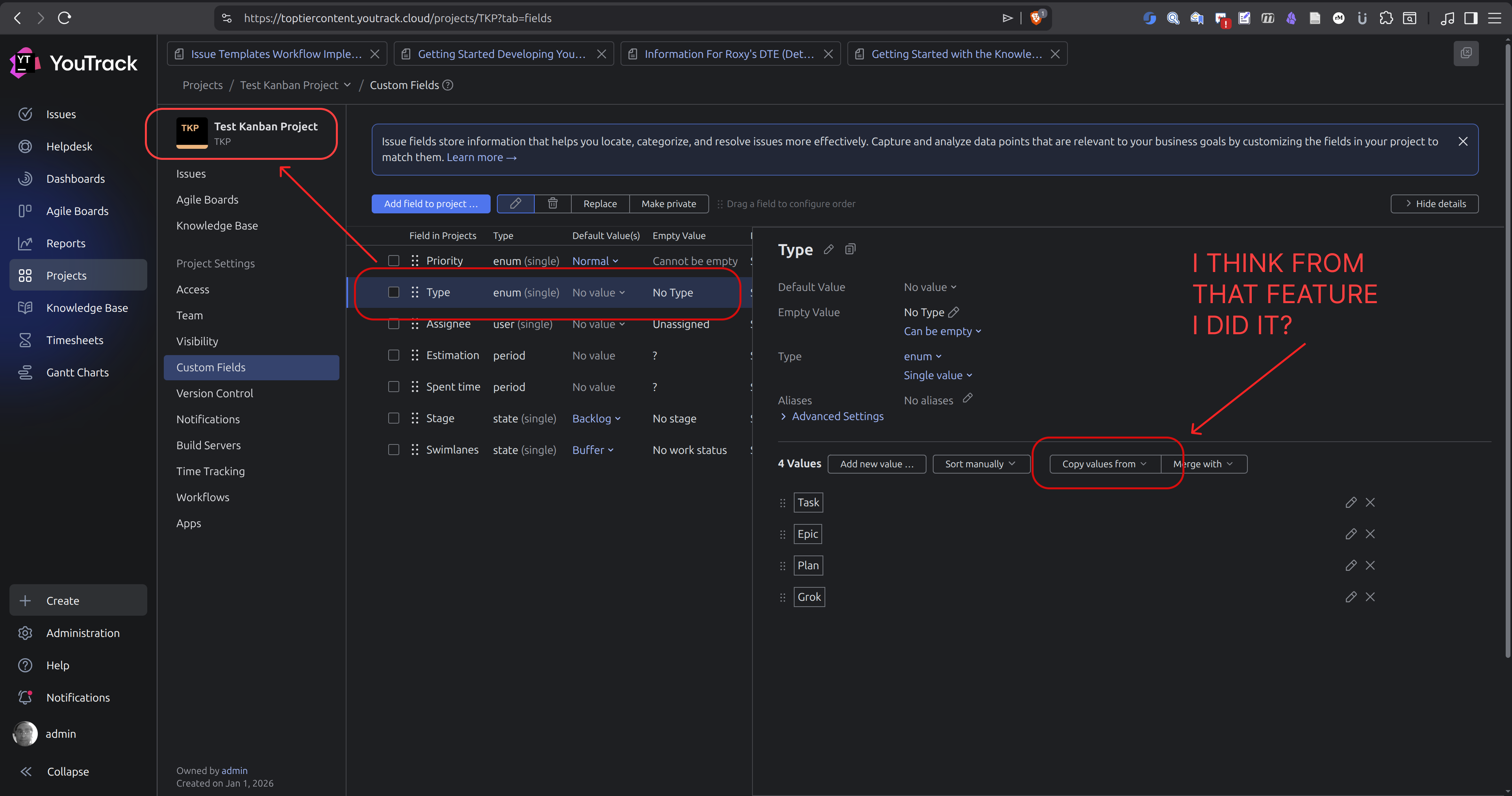
I don't know what the error “Add "Type" To the set of values for the EnumField field" is supposed to mean. First I thought it was in the keys in my object but changing that did not help, then I thought it was in my requirements block in my other file, but altering that changed nothing. The Type field in my Test Kanban Project actually came from a different project based on the Scrum project template that has that field in it (I think from using the copy feature in custom fields). I'm not really sure where to go to fix the thing. These are my app.js and reslover.js files content. The workflow was created in vscode locally then uploaded to YouTrack last night. I know that you don't include file extensions in your modules when working in the YouTrack workflow editor and after upload the extension doesn't appear in the name but when working locally I had to include it. Should I get rid of the existing Type feild and then create it directly in my project as a custom field? Where did I go wrong?
Any help would be much appreciated.
Files In Workflow:
app.js
epic-template.js
grok-template.js
manifest.json
plan-template.js
resolver.js
task-template.js
app
const entities = require('@jetbrains/youtrack-scripting-api/entities');const resolver = require('./resolver');
exports.rule = entities.Issue.onChange({ title: 'Insert Description Boilerplate',
guard: (ctx) => { // RUN ACTION WHEN TYPE FIELD VALUE CHANGES const issue = ctx.issue; const fields = ctx.fields; return ( !issue.isReported && !issue.becomesReported && issue.fields.isChanged(ctx.Type) && issue.fields.oldValue(ctx.Type) !== fields.Type.value ); },
action: (ctx) => { const issue = ctx.issue;
try { const typeFieldValue = issue.fields.Type.value;
if (!typeFieldValue) { console.log('Type field is empty, exiting'); return; }
const currentEnumId = typeFieldValue.id; const previousEnumId = ctx.state.previousTypeEnumId;
const currentDescription = issue.description || '';
let previousTemplate = null; if (previousEnumId) { try { previousTemplate = resolver.get(previousEnumId); } catch (e) { console.log('Previous template not found:', e.message); } }
const shouldReplace = currentDescription.trim() === '' || (previousTemplate && currentDescription === previousTemplate);
if (!shouldReplace) { console.log('User-modified description detected, skipping replacement'); return; }
const newTemplate = resolver.get(currentEnumId);
// REPLACE (NEVER APPEND) issue.description = newTemplate;
// TRACK PREVIOUS VALUE FOR NEXT CHANGE ctx.state.previousTypeEnumId = currentEnumId;
console.log(`Inserted template for Type enum id: ${currentEnumId}`); } catch (e) { console.log('Workflow error:', e.message); } },
requirements: { Type: { type: entities.EnumField } }});
resolver
const epic = require('./epic-template');const grok = require('./grok-template');const plan = require('./plan-template');const task = require('./task-template');
function assertString(name, value) { if (typeof value !== 'string') { throw new Error(`${name} must export a string`); }}
assertString('Epic', epic);assertString('Grok', grok);assertString('Plan', plan);assertString('Task', task);
module.exports = { // KEYS MUST MATCH ENUM IDS IN YOUTRACK epic: epic, grok: grok, plan: plan, task: task,
get: function (enumId) { if (!enumId) { throw new Error('Template key is required'); }
const template = this[enumId];
if (!template) { throw new Error(`No template for enum id "${enumId}"`); }
return template; }};
Template files all contain a module.exports = {`Template Literal Content Stub`} like the following content from one of the files:
epic-template
module.exports = `# Epic
Its just a stub now but this will be your Epic template. Replace it with the real-deal when you are ready.`;
Please sign in to leave a comment.
Hi there,
I'm Sergey from the YouTrack Team. Thanks for reaching out!
The error you're seeing is caused by an incorrect
requirementsdefinition in your workflow. TheTypefield requirement should useentities.EnumField.fieldTypeinstead of justentities.EnumField.Here's the corrected version:
Check out the Requirements Properties documentation for more details on the correct syntax.
If you're using AI tools to help build your workflow scripts, always verify the generated code against the YouTrack-specific API documentation. AI can sometimes produce code that looks correct but doesn't match YouTrack's specific domain requirements.
Let me know if you have any questions!
Sergey Merzlov
Guilty as charged. I'm not great at coding and I guess I just got a bit overwhelmed. I should have seen that in the docs. Thanks for helping me get over the hump.
Hi Jake,
No worries at all! Workflow scripting can definitely be tricky, especially when you're getting started. Using AI to help generate workflows is totally fine, just make sure to review and fix any errors against the actual YouTrack API documentation.